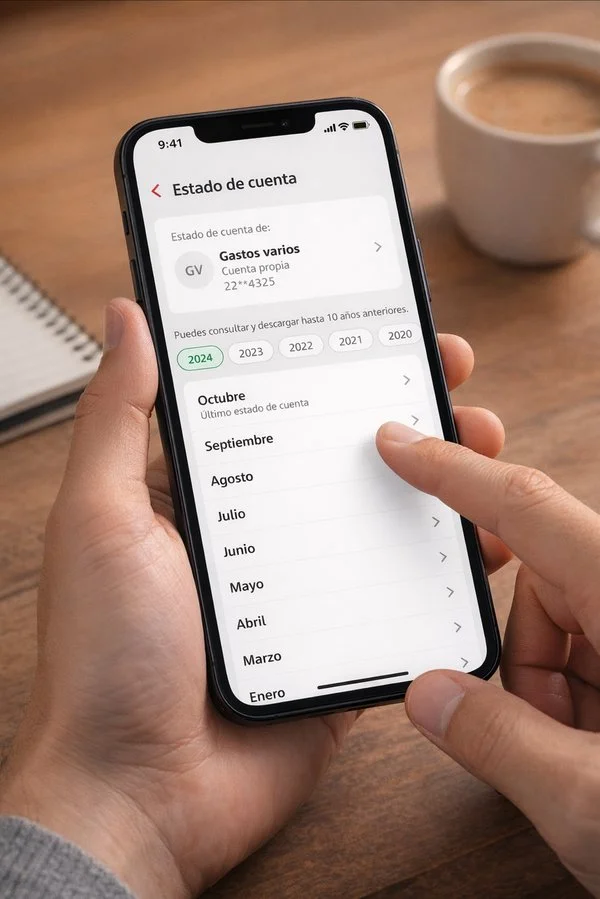
Simplifying Account Statement downloads for SME clients
Redesign of a critical business-banking feature that turned a fragmented web process into a direct, clear and secure mobile experience.
via GFT Technologies
End-to-end design lead
Launched October 2025
My role
I led the design project end to end — from the first benchmark to the handoff with Development.
Design review
I reviewed and adjusted the proposal with the Research lead, the Design System team and Content.
Daily collaboration
I kept daily communication with Development, Product, Business and the teams responsible for legal and security constraints.
Context
In Enlace Móvil, Account Statements are a key operational tool for SME clients*. They are used for reconciliation, accounting, income and expense tracking, tax compliance and working with accountants or administrative teams.
Despite that relevance, the feature was only available on the web. The original brief was to bring that flow to the mobile app — but early research showed that copying the existing experience would also carry over its problems.
* Unlike personal banking, SME users manage several accounts, need specific periods and rely on documents with operational validity.
The problem
Users needed an important document, but the system pushed its internal complexity straight into the experience. The web flow forced them through eight steps split across two separate moments:
The problem wasn't only visual. The logic of the flow itself produced delays, uncertainty and drop-offs.
Main friction points
- The feature wasn't available on mobile.
- Requesting and downloading happened at different moments.
- Users didn't know when the document would be ready.
- Period selection was slow and unclear.
- Formats most users didn't need were shown.
- Security validation added steps without explaining why.
- Consecutive downloads could fail at token confirmation.
Design a new mobile experience — not shrink the screens of the web version.
Goal
Let an SME client choose an account, select a period, validate the operation and view their Account Statement within a single mobile flow.
The experience had to
- Reduce the time needed to get the document.
- Remove visible steps that didn't need user input.
- Keep legal and security controls in place.
- Prevent invalid selections.
- Give clarity during processing times.
- Let users view the document before saving it.
- Work within the existing infrastructure.
How might we optimize a critical, highly used feature in a regulated environment, reducing friction without compromising security or regulatory compliance?
Research
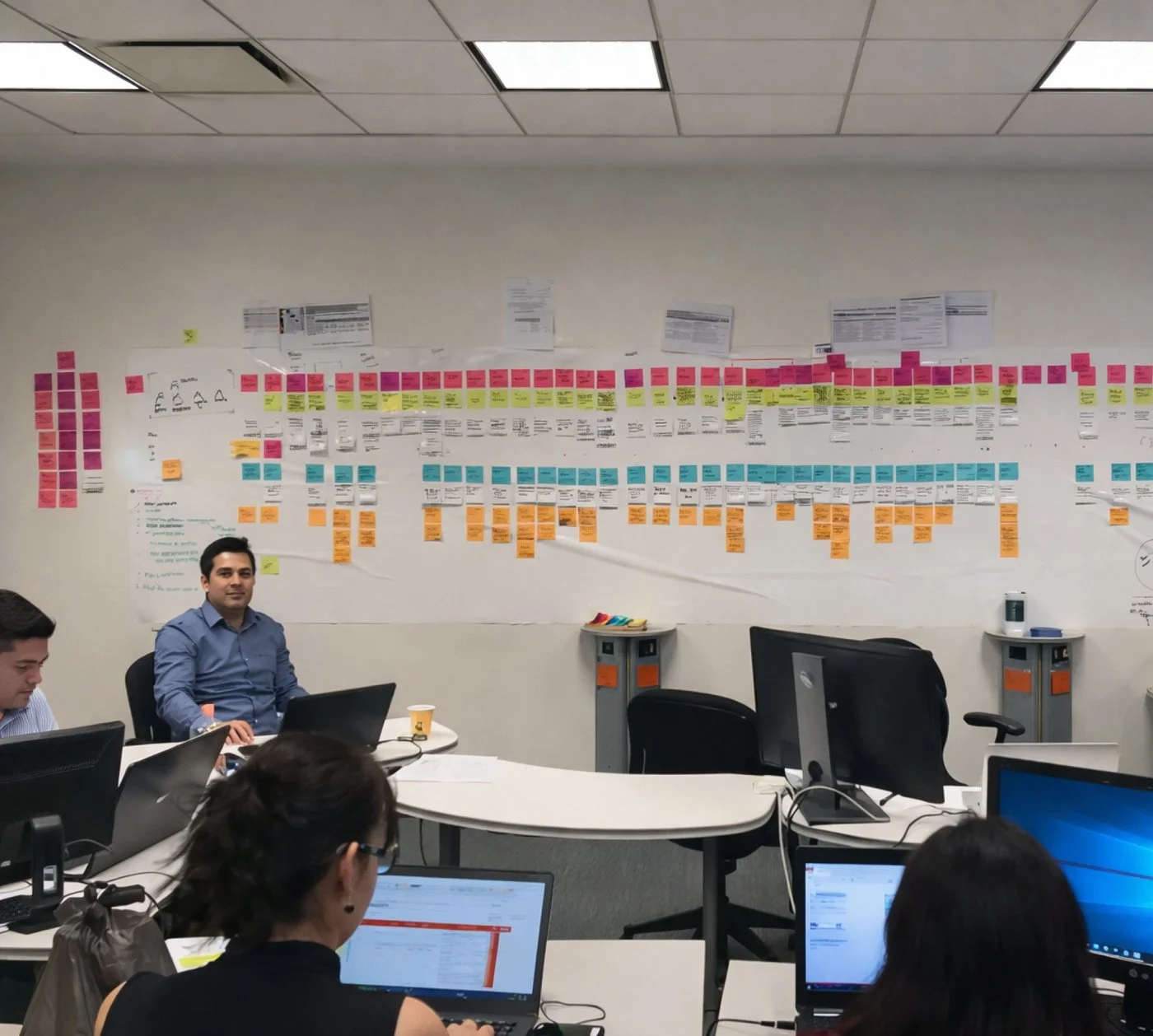
Three complementary methods helped me question the initial idea of moving the web flow as-is.
Benchmark
BBVA, Santander Personas, Nu, Mercado Pago, HSBC and other national banks. The clearest experiences used less visual load, simple lists, fewer calendars and visible cues for recent periods.
Interviews
Two accountants and one company executive. They helped me understand the document's operational value, frequency of use and the pain points of the existing process.
Maze study
Mixed profiles — accountants, executives, CEOs and managers. We explored needs, what worked and what frustrated them on web, and measured the time from login to PDF download.
Findings
Priority feature
Account Statements were the second most used feature after transfers — yet unavailable in the mobile app.
The web process was too long
The most constant complaint: request the document, wait for approval and come back later to download it.
PDF covered the main need
More than 90% of respondents mainly used PDF. None named XML as their main format.
Period selection needed simplifying
Users needed to spot available periods and find the most recent one fast, without exploring calendars or complex menus.
Strategy
The proposal was organized around four decisions that connected the research findings to the MVP.
Simplify the visible architecture
Users didn't need to know every internal request and authorization process. Those operations were consolidated to run in the background — without removing any required control.
Prioritize the most used format
The mobile MVP focused on PDF only. XML stayed available on web, as an option for future mobile iterations — fewer unnecessary decisions, one clear need.
Show only valid options
Only the years and periods available for the selected account were shown, up to ten years of history. Users could never proceed with an invalid combination.
Security at the right moment
The digital token was requested after choosing account and period, right before generating the document — meeting Legal and Security requirements without interrupting earlier decisions.
Design decisions
Each decision is tied to evidence, the constraint it had to respect, the solution and its effect.
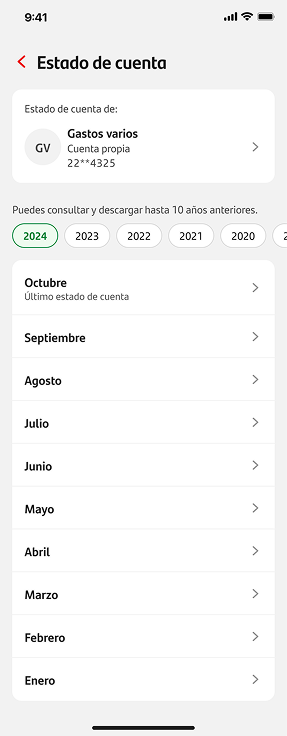
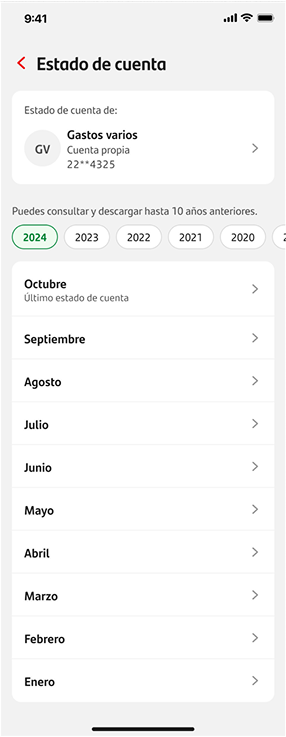
From a dropdown to a visible list
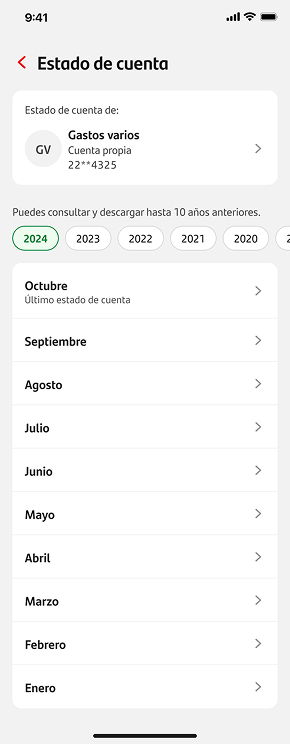
The first proposal used a button that opened a dropdown to choose the period. The benchmark showed clearer apps rely on simple, scannable lists.
Available years appear as tabs (up to 10 years, due to system limits) and only the months available for that account are listed, with the most recent period labeled.
Fewer steps, no unnecessary calendars, and no way to pick a period that doesn't exist.
Choosing the right product
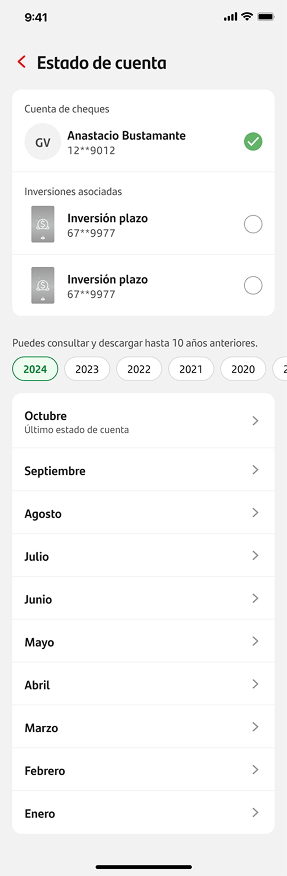
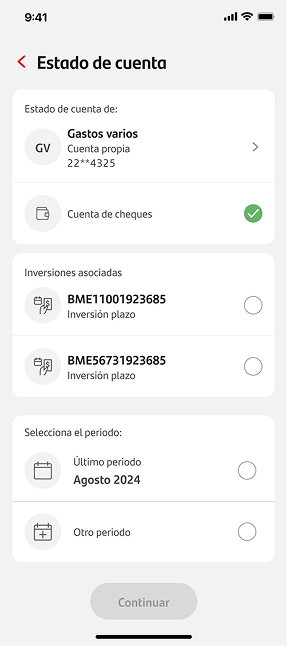
Users with several financial products could confuse accounts with their associated investments.
The system didn't allow selecting the investment at an earlier step.
Investments linked to an account appear once the account is selected, and the user picks the product with a radio button.
Request and authorization in the background
On web, users had to leave the flow while the document was authorized, then return to find it.
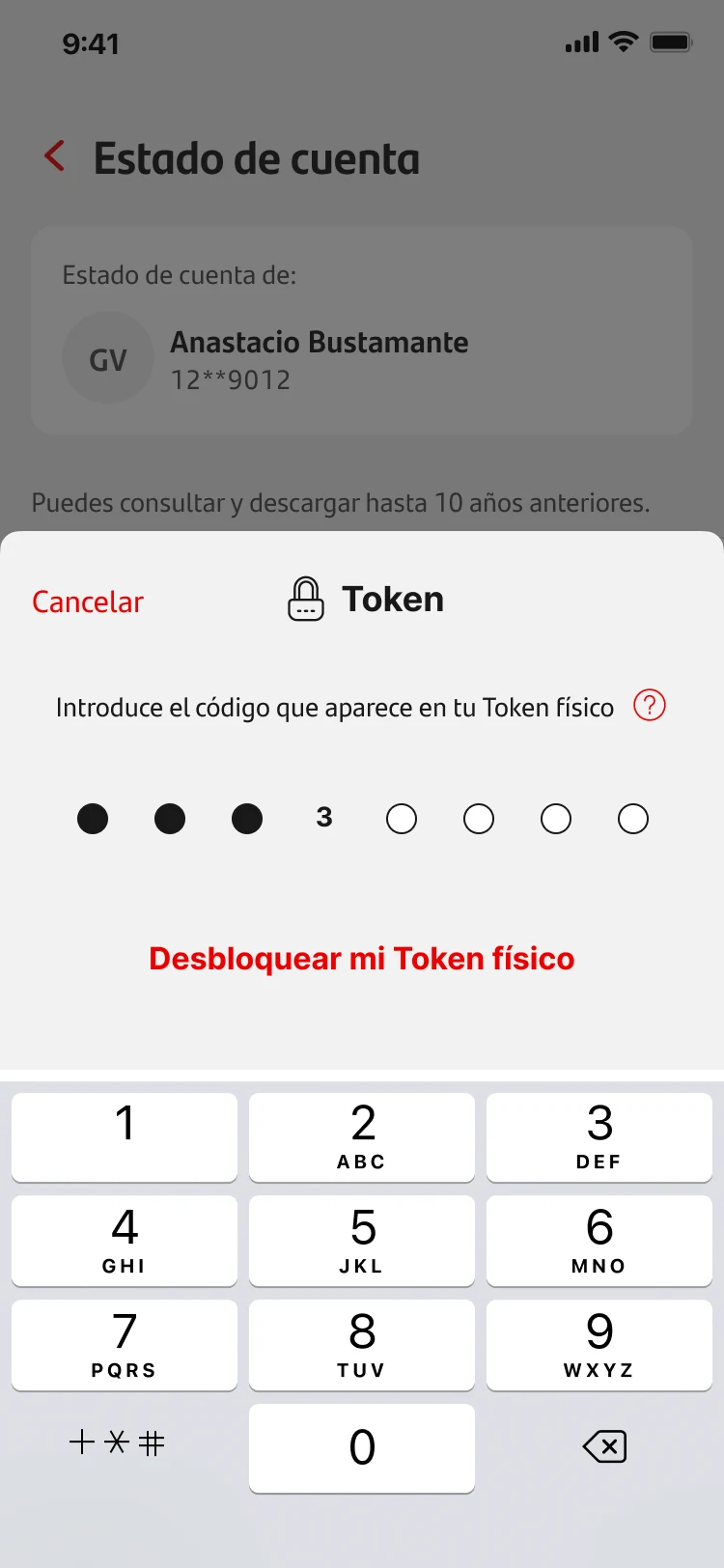
Request and authorization were consolidated into a single operation. After token validation, a ~5-second loader covers the processing, and the document opens in the viewer.
The required logic stays in place — users just no longer have to understand or manage it.
View before downloading
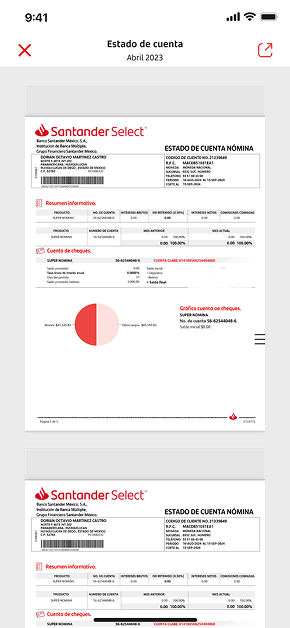
Users need to be sure they have the right document before storing or sharing it.
Once generated, the statement opens immediately in a viewer. Users can confirm it's the right document, read it without downloading a file, and save the PDF only when needed.
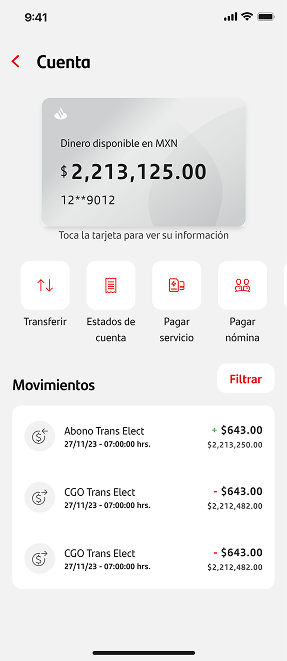
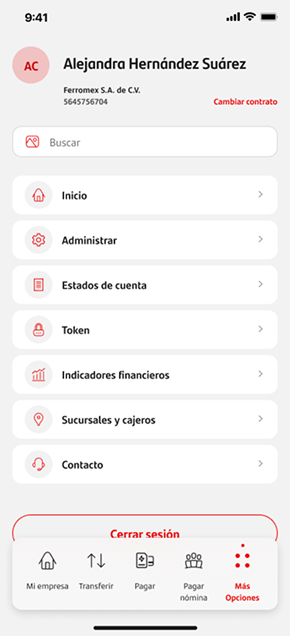
Access from Account Overview
As the second most used feature, Account Statements deserved a direct entry point.
A button on the product overview screen opens period selection with the account already chosen.
Also designed
Handling consecutive downloads
Requesting another statement within 30 seconds could break token confirmation. I brought Design, Business, Development and Legal together; Development confirmed the interval could safely drop to 20 seconds. Since it couldn't be removed, a dynamic countdown explains the wait and shows exactly when to try again.
Unavailable periods and errors
If a period doesn't exist for the selected account, it isn't listed. If a temporary error occurs while generating, the system asks the user to wait a moment and try again — invalid actions are prevented and users always know what to do next.
Collaboration & feasibility
The loader proposal raised questions about possible legal and security conflicts. I took the initiative to set up conversations between Design, Business, Development and Legal to review the solution before moving forward.
Collaboration started on day one — we didn't wait for the handoff to check feasibility. That let design decisions fit what the system could really do.
Security review: no changes required
The later Security validation passed without changes, because the critical points were already covered:
- Account and period selected beforehand
- Confirmation with digital token
- Controlled processing
- Document access only after validation
Iterations
The project went through three main iterations, reviewed with Product and Development to balance clarity, security and technical feasibility. Early explorations included format tabs and date-picker wheels that were later simplified.
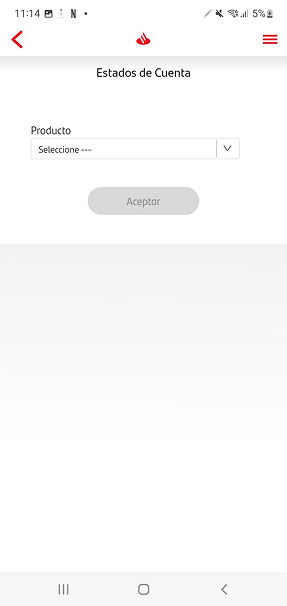
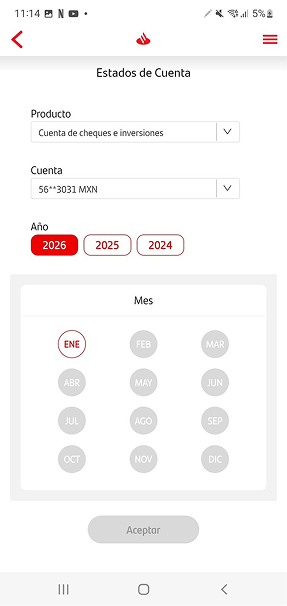
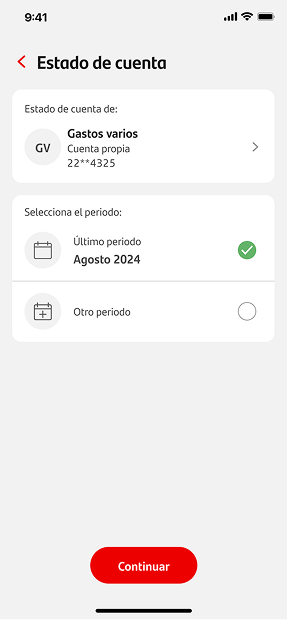
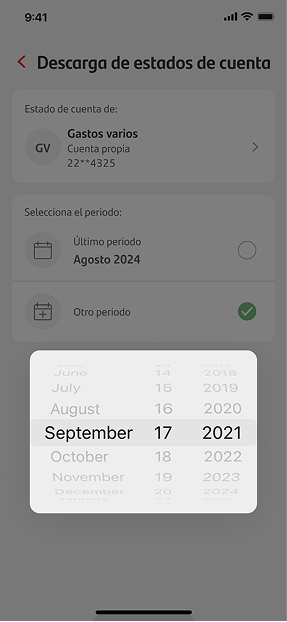
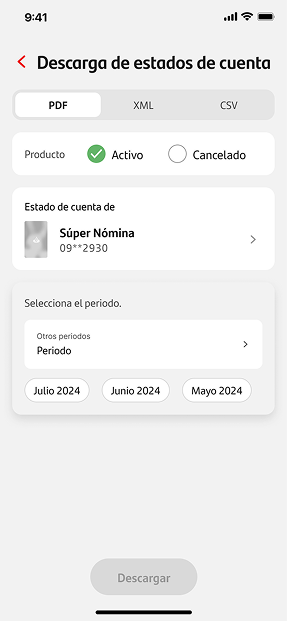
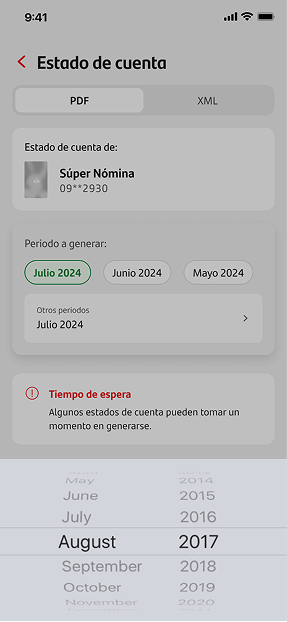
Iteration 2 explored PDF, XML and CSV tabs; the format choice was later discarded — the mobile MVP is PDF-only and XML stays on web.
Biggest changes across iterations
- Replaced the period dropdown with a visible list.
- Clearly labeled the most recent period.
- Showed only valid time ranges.
- Limited the MVP to PDF — XML stays on web.
- Added the document viewer.
- Consolidated request and authorization with a loader.
- Designed error and waiting states.
- Added the countdown between consecutive downloads.
Functional MVP test
We ran a testing round with 10 friends-and-family participants. Each person was asked to:
Time was measured from login to a correct PDF download. Later adjustments focused on handling consecutive requests and communicating the required wait.
The comparison used different groups: 16 participants for the web flow and 10 for the functional MVP. The result should be read as a comparative usability signal, not a controlled experiment.
Final MVP flow
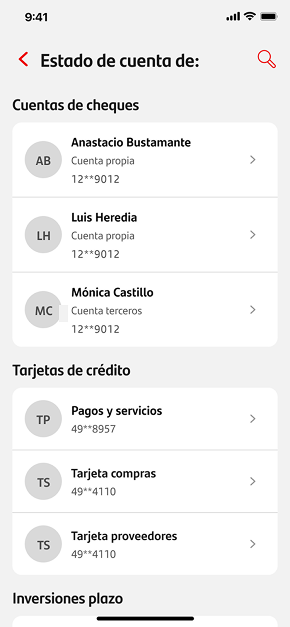
One continuous flow: from entry point to a viewable PDF, with security and processing handled at the right moment.
Request, wait with no visibility, leave, come back later, find the document and download it.
Choose account and period, confirm with token, wait ~5 s and see the PDF right away.
Handoff & implementation
I documented the flow, states and specs in Figma so anyone on the team could understand the solution, and prepared a presentation covering:
The handoff continued a daily collaboration with Development — it wasn't the first time engineering saw the proposal. The tested MVP and the launched version were the same.
Results
The MVP reached production in October 2025 and was considered a success by the business area.
More completions
Post-launch analytics showed a 38% increase in completion rate vs. the previous web flow.
Less time in testing
In the comparative evaluation, the MVP let users complete the task 34% faster.
MVP completion
All 10 participants chose an account, selected a period and downloaded the document without help.
Less wait between downloads
Cross-team collaboration cut the technical interval from 30 to 20 seconds.
A general improvement was also observed in support requests, calls and branch visits related to Account Statements, although separate figures for each channel weren't kept.
Conclusion
I turned a fragmented web process into a continuous mobile flow for viewing and downloading Account Statements. The MVP was 34% faster in the comparative test, all 10 participants completed the task without help, and the completion rate grew 38% after launch. The solution reached production in October 2025 and kept the bank's legal, technical and security requirements.
Key takeaway
Simplifying a regulated product doesn't mean ignoring its constraints. It means understanding them, challenging the ones that can change and clearly communicating the ones that must stay.
Learnings

Don't carry over an outdated structure
Taking a feature from web to mobile doesn't mean copying its screens. First, check whether the original logic still serves the user's needs.

Technical complexity doesn't always need to be visible
The system kept its request, authorization and security processes — users just stopped managing them manually. Simplifying didn't mean removing controls; it meant organizing the experience around the user's task.

Work within the constraints
The existing infrastructure imposed real limits. The design work was to understand them, challenge them where there was room, and clearly communicate the ones that had to stay.
Collaboration must start before the handoff
Early conversations with Development, Business, Legal and Security made it possible to build a solution that could be implemented without losing clarity or control.
Designing a seamless identity verification flow
Designing a guided biometric verification experience that reduces uncertainty, prevents errors and enables secure onboarding.